December 23, 2025
Best Spend Management & Corporate Cards Software for Small Business in the US
PayEm Team

Sign up for our newsletter
Stay informed with the latest trends and best practices in finance and procurement.

If you're running a small business in the US, managing company spending probably looks something like this:
Employees buy things with personal cards and wait weeks for reimbursement. Or you've got one shared company card that three people use, and nobody really knows who spent what on what. Maybe you're manually entering credit card transactions into QuickBooks at month-end, trying to track down receipts from purchases made six weeks ago.
According to recent industry data, 72% of finance teams spend 520+ hours per year on manual accounts payable tasks that could be automated. For a small business with limited finance staff, that's crushing.
The good news? Modern spend management software has gotten significantly better—and more affordable—for small businesses. You don't need enterprise budgets or three-month implementations anymore.
This guide breaks down the best spend management and corporate card platforms for small businesses in the US, with actual pricing, feature comparisons, and honest assessments of what works (and what doesn't) when you're a team of 10-100 people.
What Is Spend Management Software (And Do Small Businesses Actually Need It)?
Spend management software combines three things:
- Corporate cards - Physical and virtual cards with built-in spending controls
- Expense tracking - Automated receipt capture and categorization
- Accounting integration - Real-time sync with QuickBooks, Xero, or NetSuite
The traditional approach goes like this: Employees use personal cards → Submit expense reports → Finance manually enters everything into accounting software → Reimbursement issued weeks later.
Modern spend management: Employees use company virtual cards → Transactions automatically sync to QuickBooks → Receipts auto-match → Manager approves in-app → Zero manual entry
When Small Businesses Actually Need This
You probably need spend management if:
- You have 10+ employees making regular business purchases
- Monthly company spend exceeds $10,000
- Your finance person spends more than 5 hours per week on expense processing
- You're using QuickBooks, Xero, or similar accounting software
- Employees are frustrated with slow reimbursements
- You want to see spending in real-time, not weeks later
You probably don't need it if:
- Under 5 employees total
- Monthly spend under $3,000
- You do simple cash-basis accounting
- Manual processes are working fine
- Very limited budget for any new software
The basic math: If your finance person spends 10 hours per month processing expenses at $30 per hour, that's $3,600 annually. Most small business spend management platforms cost $500-$2,000 per year. The time savings alone cover the cost.
Top 7 Spend Management Platforms for Small Business (2026)
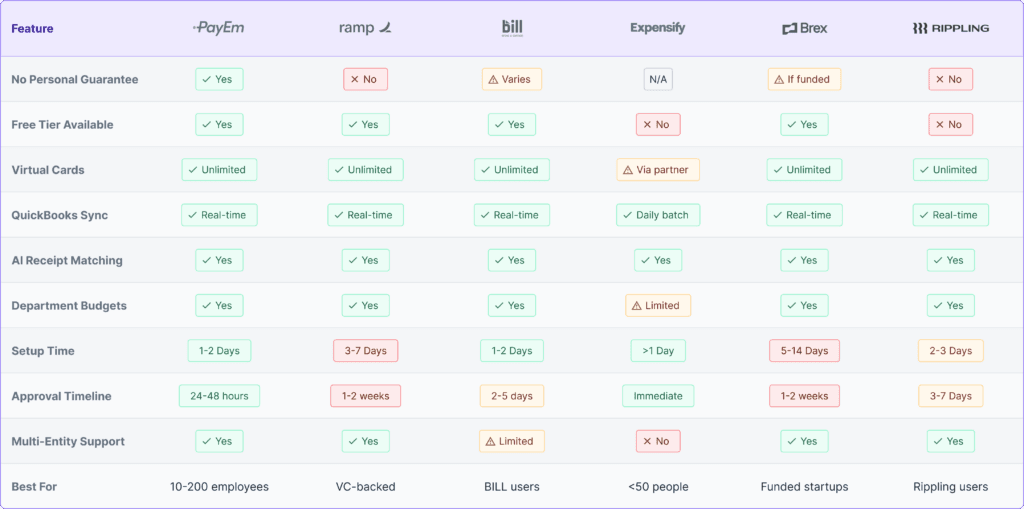
Here's a comparison of the best options, including the good, the bad, and who each platform is actually designed for.
1. PayEm - Best Overall for Small-Medium Businesses
Best for: US small businesses (10-200 employees) that want no personal guarantees plus full automation
Pricing:
- Free tier available
- Paid plans start at $12 per user per month
- No setup fees or hidden costs
What You Get:
- No personal guarantee required - Underwrites based on business metrics, not founder credit scores
- Unlimited virtual cards - Issue cards instantly to any employee
- QuickBooks/Xero auto-sync - Real-time transaction sync with automatic GL coding
- AI receipt matching - OCR extracts data and automatically matches to transactions
- Department budgets - Set spending limits by team with automatic enforcement
- Multi-entity support - Handle multiple business entities in one platform
- Approval workflows - Custom approval chains by amount or merchant type
What Makes PayEm Different:
PayEm is one of the few platforms that doesn't require founders to personally guarantee the card. Most competitors (including Brex and Ramp) require personal guarantees or significant cash deposits, which puts your personal assets at risk if the business hits a rough patch.
Integrations: QuickBooks Online, Xero, NetSuite, Slack, Microsoft Teams, Bill.com
Assessment:
Pros:
- No personal guarantee or credit check on founders
- Fast approval process (24-48 hours versus weeks)
- Built specifically for distributed and remote teams
- Strong accounting automation features
- Responsive customer support
Cons:
- Newer brand with less name recognition than Brex or Ramp
- Smaller user community for peer support and best practices
Best fit: Small to medium businesses that want founder financial protection, full automation, and don't want to risk personal assets for company spending.
2. Ramp - Best for Cost Optimization
Best for: Fast-growing small businesses focused on finding cost savings
Pricing:
- Free tier available (revenue from interchange fees)
- Ramp Plus: $15 per user per month
- Enterprise: Custom pricing
What You Get:
- AI-powered savings insights
- Unlimited virtual and physical cards
- Automated receipt scanning
- Vendor management tools
- Price intelligence that alerts you to overpriced subscriptions
What Makes Ramp Different:
Ramp's AI actively looks for ways to save you money—flagging duplicate subscriptions, negotiating vendor discounts, and recommending cheaper alternatives to tools you're currently using.
Integrations: QuickBooks, Xero, NetSuite, Sage Intacct, Rippling, Workday, 1,000+ apps via Zapier
Assessment:
Pros:
- Free tier is actually useful (not just a trial)
- Strong cost-saving and optimization features
- Fast implementation process
- Well-designed mobile app
Cons:
- Requires personal guarantee from founders
- Approval process can take 1-2 weeks
- Built primarily for VC-backed startups (may decline bootstrapped businesses)
- Limited customer support on free tier
Best fit: Businesses with strong revenue growth that can easily qualify.
3. BILL Spend & Expense (formerly Divvy) - Best for QuickBooks Users
Best for: Small businesses already using BILL for accounts payable or receivable
Pricing:
- Free (interchange fee revenue model)
- Some transaction fees may apply
What You Get:
- Real-time spend controls
- Virtual and physical corporate cards
- Budget management by department
- Automated expense categorization
- Integration with BILL's AP and AR products
What Makes BILL Different:
If you're already using BILL for paying bills or invoicing customers, Spend & Expense integrates seamlessly. All your financial operations live in one ecosystem.
Integrations: QuickBooks, Xero, NetSuite, Sage Intacct, plus native integration with BILL's entire platform
Assessment:
Pros:
- Completely free to use
- Simple setup, especially for existing BILL customers
- Solid budget tracking features
- Good mobile app experience
Cons:
- Fewer advanced features compared to Ramp or Brex
- Customer support can be slow to respond
- Limited procurement features
- May require personal guarantee depending on business profile
Best fit: Small businesses already using BILL for AP or AR who want straightforward card and expense management.
4. Expensify - Best for Expense Reporting Only
Best for: Small teams (5-50 people) that just need expense report automation
Pricing:
- Collect plan: $5 per active user per month
- Control plan: $9 per active user per month
What You Get:
- SmartScan receipt OCR technology
- Automatic credit card transaction import
- Next-day reimbursements to employees
- Simple approval workflows
- Travel booking integration
What Makes Expensify Different:
Expensify pioneered automated receipt scanning back in the day. It's incredibly simple to use—employees genuinely like the mobile app.
Integrations: QuickBooks, Xero, NetSuite, Sage, and most major accounting platforms
Assessment:
Pros:
- Extremely easy to use and learn
- Fast employee adoption (the app is genuinely good)
- Affordable for small teams
- Next-day reimbursements keep employees happy
- Only pay for active users, not all employees
Cons:
- Limited spend control features (more reactive than proactive)
- No native corporate cards (uses partner cards)
- Fewer automation features than modern platforms
- Not ideal if you want proactive spend management
Best fit: Small businesses that just need expense report automation, not full spend management and control.
Brex - For VC-Backed Startups
Best for: Funded startups.
Pricing:
- Essentials: Free tier
- Premium: $12 per user per month
- Enterprise: Custom pricing
What You Get:
- Higher credit limits for startups
- Comprehensive travel and expense management
- Rewards program with points redeemable for travel
- Vendor management tools
- Cash management account with yield
What Makes Brex Different:
Brex was specifically designed for startups. They offer higher spending limits than traditional business cards and don't require personal guarantees from well-funded companies.
Integrations: QuickBooks, Xero, NetSuite, Sage Intacct, Slack, Workday, BambooHR
Assessment:
Pros:
- High credit limits for funded startups
- Strong rewards program
- Startup-friendly underwriting approach
- Solid expense automation features
Cons:
- Requires significant revenue or venture funding to qualify
- Not accessible to bootstrapped small businesses
- Reduced service quality for smaller accounts
- Customer service issues frequently reported
Best fit: VC-funded startups with more than $500,000 in revenue or significant funding rounds ($1M+).
6. Rippling Spend - Best If You Use Rippling for HR
Best for: Companies using Rippling for payroll and HR management
Pricing:
- Starting at $8 per user per month (billed annually)
- Requires Rippling Core platform subscription
What You Get:
- Automated expense approvals
- Corporate card management
- Real-time policy enforcement
- Multi-currency support
- Deep integration with Rippling HR and payroll
What Makes Rippling Different:
Employee data automatically syncs from Rippling HR—new hires automatically get cards provisioned, departing employees get auto-deactivated on their termination date.Integrations: Native to Rippling ecosystem, plus QuickBooks, NetSuite, Slack, Microsoft 365
Assessment:
Pros:
- Seamless integration if you already use Rippling
- Automated employee card provisioning tied to HR
- Strong approval workflows
- Good compliance controls
Cons:
- Requires Rippling Core subscription ($8 per user as base cost)
- Less feature-rich than standalone spend management platforms
- Expensive for companies not using Rippling for HR
- Feature development slower than dedicated spend platforms
Best fit: Existing Rippling customers who want unified HR, payroll, and spend management.
Sage Expense Management (formerly Fyle) - Best for Existing Card Automation
Best for: Small businesses wanting to add automation to existing corporate cards
Pricing:
- Starting at $11.99 per user per month (billed annually)
- Free trial available
What You Get:
- Real-time credit card reconciliation
- Works with your existing Visa, Mastercard, or Amex cards
- AI-powered receipt data extraction
- Budget alerts by project or cost center
- Multi-currency and per diem tracking
What Makes Sage Different:
You don't need to switch cards - Sage works with your existing corporate cards and adds automation and controls on top of them.
Integrations: NetSuite, Sage Intacct, Xero, QuickBooks, Sage 300 CRE, TravelPerk, BambooHR
Pricing Reality Check: What You'll Actually Pay
Marketing websites love to say "$0/month" but here's what you'll really spend:
Scenario: 25-Person Small Business
Monthly company spend: $50,000
Active card users: 15 employees
Finance team: 1 part-time bookkeeper
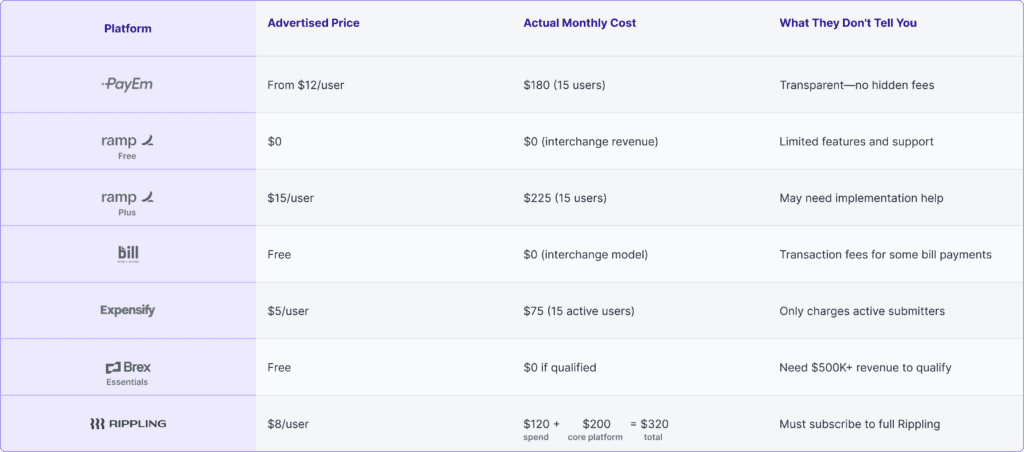
Bottom line: "Free" platforms work if you qualify and don't need advanced features. For full functionality, expect to pay $150-$300 per month for a 25-person team.
The Real ROI: Time Savings Calculator
Let's calculate what spend management software actually saves a small business:
Before Automation (Manual Process)
Finance team time per month:
- Manually entering 200 transactions: 10 hours
- Chasing missing receipts from employees: 6 hours
- Categorizing and coding expenses: 5 hours
- Month-end reconciliation: 8 hours
- Fixing errors and duplicate entries: 4 hours
- Total: 33 hours per month
Employee time per month:
- 15 employees × 30 minutes per expense report × 2 reports per month = 15 hours total
- Time spent waiting for reimbursements: Morale cost (hard to quantify in dollars)
Combined: 48 hours per month = 576 hours per yearCost at $40/hour blended rate: $23,040 annually just for labor
After Automation
Finance team time per month:
- Review auto-synced transactions: 2 hours
- Handle edge cases (about 5% of transactions): 2 hours
- Month-end review: 2 hours
- Total: 6 hours per month
Employee time per month:
- Snap receipt photos via mobile app: 2 hours combined (all employees)
Combined: 8 hours per month = 96 hours per year
Cost at $40/hour: $3,840 annually
Annual Savings: 480 hours per year = $19,200 in labor cost savings
Typical platform cost: Around $2,400 per year
Net annual savings: Approximately $16,800
Return on investment: 700%
Plus these intangible benefits you can't easily measure:
- Faster month-end close (saves 3-4 days)
- Better cash flow visibility
- Happier employees who don't wait for reimbursements
- Fewer errors in your financial statements
- More time for strategic finance work
Must-Have Features for Small Business
Not all features matter equally when you're running a small business. Here's what actually moves the needle:
Critical Features (Must Have)
1. QuickBooks or Xero Integration
Why it matters: About 80% of small businesses use QuickBooks or Xero. Manual CSV export and import defeats the entire purpose of automation.
What to look for: Real-time sync, not end-of-day batch processing.
2. Virtual Card Issuance
Why it matters: Issue cards instantly without shipping delays. Set specific spend limits per person. Cancel compromised cards immediately. Track all your subscription spending.
What to look for: Truly unlimited virtual cards, not "up to 50 cards" limits.
3. Receipt Capture via Mobile App
Why it matters: Employees snap photos immediately after purchase. OCR extracts merchant name, date, and amount. Auto-matches to the correct transaction. No more lost paper receipts.
What to look for: Simple mobile app that employees will actually use.
4. Department or Project Budgets
Why it matters: Set monthly limits per team. Get alerts when you hit 75% and 90% of budget. Automatically prevent overspending. Track which teams or projects are profitable.
What to look for: Easy budget setup without complex configuration.
5. Approval Workflows
Why it matters: Require manager approval for purchases over certain amounts. Block purchases that violate company policy. Send email or Slack notifications. Create an audit trail for compliance.
What to look for: Flexible approval rules you can customize.
Important Features (Should Have)
6. Spending Controls
- Merchant category restrictions (block gambling, adult content, personal purchases)
- Per-transaction limits (maximum $500 per purchase)
- Time restrictions (business hours only for certain cards)
- Location controls (block international transactions if needed)
7. Real-Time Reporting Dashboard
- See spending by category as it happens
- Compare budget versus actual spending
- Identify top spending employees or departments
- Track monthly spending trends
8. Multi-User Access Levels
- Bookkeeper access with appropriate permissions
- Manager approval rights
- Employee self-service for their own cards
- Accountant read-only access for month-end
Nice to Have Features (Bonus)
9. Cash Back or Rewards Programs
- 1-2% cash back on business purchases
- Can help offset platform subscription costs
- Often better than personal card rewards
10. Bill Payment Capabilities
- Pay vendors directly from the platform
- Schedule recurring vendor payments
- Reduce check writing
11. Travel Booking Integration
- Book flights and hotels within the app
- Automatic expense entry creation
- Enforce company travel policy
Common Small Business Questions Answered
Q: Do I need to switch banks?
A: No. Most spend management platforms work perfectly fine with your existing business checking account. You simply fund the card program from your current bank.
Q: What if I already have a business credit card?
A: You have two reasonable options:
- Keep your existing card for certain purchases and use the new platform for most spending
- Gradually phase out the old card as you build trust in the new system
Some platforms like Sage Expense Management actually work with your existing cards and just layer automation on top.
Q: Will this work with my bookkeeper?
A: Yes. Most platforms offer specific accountant or bookkeeper access levels. Your bookkeeper can log in, see all transactions, and categorize expenses without needing to bother you for information.
Q: What about employee reimbursements?
A: Most modern platforms support both approaches:
- Corporate cards for regular predictable business spending
- Reimbursements for occasional personal card usage
- Mileage tracking and automated reimbursement
Over time, you'll naturally shift toward corporate cards for 90%+ of spending because it's easier for everyone.
Q: How fast can I actually get approved?
Typical approval timelines based on real small business experiences:
- PayEm: 24-48 hours
- BILL Spend & Expense: 2-5 days
- Expensify: Instant (it's just expense software, not credit)
- Ramp: 3-7 days
- Brex: 5-14 days (or outright declined if you don't meet their criteria)
What speeds up approval:
- Clean, consistent bank statements
- Steady revenue history
- Business email domain (not Gmail)
- Existing business credit history
Q: What if my business has seasonal revenue?
A: Look specifically for platforms that:
- Don't require perfectly consistent month-to-month revenue
- Offer flexible credit limits that adjust
- Allow you to fund cards from cash reserves during slower months
PayEm and BILL tend to be more flexible with seasonal businesses compared to platforms built for VC-backed startups.
Bottom Line: Best Overall for Most Small Businesses
For the majority of small businesses in the US (10-100 employees, $10,000-$100,000 in monthly spend), PayEm offers the best overall balance:
No personal guarantee - Founder assets stay protected
Fast approval process - 24-48 hours versus weeks
Full automation - QuickBooks sync, AI categorization, receipt matching
Transparent pricing - $12 per user with no hidden fees
Quick implementation - Up and running in 1-2 days
Unlimited virtual cards - Issue instantly to any employee
Automated department budgets - Set it and forget it
Getting Started with PayEm
PayEm was built specifically for small to medium-sized businesses that want:
- Founder financial protection (no personal guarantees on the line)
- Full accounting automation without enterprise complexity
- Fast approval and implementation
- Transparent, affordable pricing
What makes PayEm different from alternatives:
✓ Business-based underwriting - Approved based on your company's cash flow and revenue, not your personal credit score
✓ 24-48 hour approval timeline - Fastest approval process in the industry
✓ Complete automation - Not just cards, but full accounts payable automation included
✓ US-based customer support - Real humans who respond quickly when you need help