December 10, 2025
Virtual Corporate Cards for Distributed Teams: Complete Setup Guide

Sign up for our newsletter
Stay informed with the latest trends and best practices in finance and procurement.

Article Content
Your engineering team is spread across 8 states. Marketing contractors are in 4 countries. Customer support operates in 3 time zones. Everyone needs to make purchases: software subscriptions, conference tickets, client dinners, contractor payments.
How do you manage all this spending without creating a finance bottleneck or losing visibility into cash flow?
Traditional approaches don't work. Reimbursements take weeks and frustrate employees. Shared company cards create zero accountability. Physical cards have shipping delays and get lost in the mail.
The answer: Virtual corporate cards designed for distributed teams.
According to recent industry data, the average expense report takes 20 minutes to complete, and nearly 20% of expense reports contain errors. For a remote team of 100 employees submitting weekly expenses, that's 160+ hours per month lost to manual expense; this doesn't count the finance team's time processing everything.
This guide shows you exactly how to implement virtual cards for your distributed team, with step-by-step workflows, policy templates, and real examples from companies that made the switch.
The Hidden Cost of Traditional Expense Management for Remote Teams
Before we dive into solutions, let's understand what's actually broken.
Problem #1: Reimbursement Delays Kill Morale
When employees use personal cards for business expenses, they're essentially lending money to the company. For remote teams, this creates serious problems:
- Delayed expense reimbursements are the #1 employee satisfaction issue in distributed organizations
- Employees often wait 2-4 weeks (or longer) for reimbursement
- High-spending roles (sales, travel, events) can carry $5K-$10K in personal debt
- Finance teams spend hours each week chasing receipts and approvals
One finance manager at a 120-person distributed SaaS company told us they were frequently out-of-pocket for $150,000 due to unpaid reimbursements. After switching to virtual cards, they slashed reimbursement cycles by 90%: from 6-9 months to 30-40 days.
Problem #2: Shared Cards = Zero Accountability
Many companies try to solve remote spending by issuing shared team cards. This creates more problems than it solves:
- No way to track who spent what
- Finance teams discover unauthorized purchases weeks later
- Difficult to enforce spending policies
- Security risk if one team member's credentials are compromised
Problem #3: Physical Cards Don't Work at Scale
Shipping physical cards to distributed teams is a logistics nightmare:
- 1-2 week delivery times for new hires
- Cards get lost in international mail
- Address changes require card replacements
- Can't issue cards quickly for contractors or temporary team members
The virtual cards market is projected to grow from $474.23 billion in 2024 to $565.12 billion in 2025, driven largely by remote work adoption.
How Virtual Cards Solve Distributed Team Challenges
Virtual corporate cards eliminate these problems by giving finance teams real-time control while empowering employees to spend independently.
What Are Virtual Corporate Cards?
Virtual cards are digital payment credentials issued instantly through a software platform. Each card has:
- Unique card number, CVV, and expiration date
- Customizable spending limits (per transaction, daily, monthly)
- Merchant category restrictions (block certain types of purchases)
- Real-time transaction notifications
- Automatic receipt capture and GL code assignment
Think of them as individual payment instruments you can issue in seconds, control precisely, and cancel instantly if needed.
Key Advantages for Remote Teams
Instant Issuance
New hire starts Monday? Issue them a virtual card Friday afternoon. No shipping delays, no waiting.
Granular Control
Set exactly how much each person can spend, where they can spend it, and when. Change limits in real-time as budgets shift.
Real-Time Visibility
See every transaction as it happens, not weeks later when expense reports trickle in.
Better Security
Each team member gets their own card. If compromised, freeze one card without impacting the entire team.
Automated Reconciliation
Transactions sync directly to your accounting system with receipts and GL codes already attached.
Step-by-Step Implementation Guide
Here's exactly how to roll out virtual cards for your distributed team, based on implementations we've seen work at companies from 20 to 500+ employees.
Phase 1: Design Your Spending Policy (Week 1)
Before issuing cards, document clear spending policies. Remote teams need written guidelines because they can't just walk over to finance with questions.
Essential Policy Elements:
- Who gets cards?
- Full-time employees? Yes
- Contractors? Depends on role
- Interns? Usually not unless specific need
- What's allowed?
- Software subscriptions: Approved
- Client meals: Approved with receipt
- Personal items: Never
- Alcohol: Check local laws and company culture
- Spending limits by role:
- Individual contributors: $500-$2,000/month
- Team leads: $2,000-$5,000/month
- Department heads: $5,000-$20,000/month
- Executives: Custom limits
- Approval workflows:
- Under $500: Auto-approved within policy
- $500-$2,000: Manager approval
- Over $2,000: Finance approval
- Receipt requirements:
- All transactions over $25 require receipt
- Upload within 48 hours of purchase
- Missing receipts = card temporarily frozen
Phase 2: Set Up Department Budgets (Week 1-2)
Virtual cards work best when tied to department budgets, not just individual limits.
Budget Structure Example:
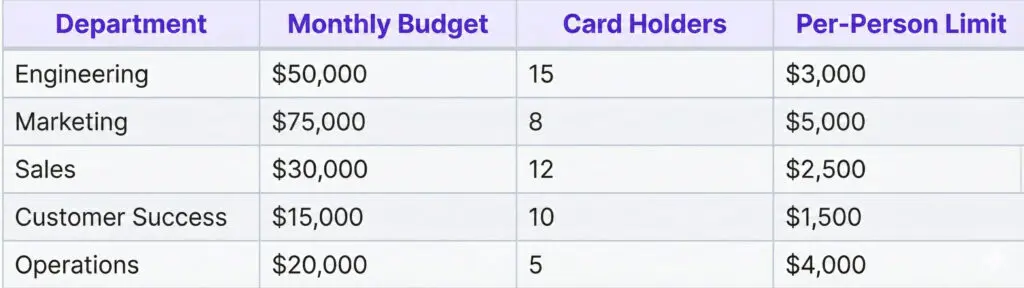
How to implement:
- Pull last 6 months of spending by department
- Calculate average monthly spend + 20% buffer
- Assign budgets in your virtual card platform
- Set alerts at 75% and 90% of budget
Pro tip: Start with conservative limits. It's easier to increase limits than explain why you're decreasing them.
Phase 3: Create Onboarding Workflow (Week 2)
Remote employees need a clear, self-service process to get started with virtual cards.
Day 1 Onboarding Checklist:
☐ Before employee's first day:
- Create account in virtual card platform
- Issue virtual card with initial $1,000 limit
- Assign to appropriate department budget
- Add to spend notification group
☐ Day 1 morning:
- Send welcome email with card details
- Include link to spending policy
- Provide mobile app download links
- Schedule 15-min virtual card orientation
☐ First week:
- Employee makes first small purchase ($20-$50)
- Confirms receipt upload process works
- Reviews transaction in mobile app
- Manager approves first purchase
Email Template:
Subject: Your PayEm Virtual Card is Ready
Hi [Name],
Welcome to the team! Your PayEm virtual card is ready to use.
Card Details:
- Monthly Limit: $1,000
- Department: [Engineering/Marketing/etc.]
- Card expires: [Date]
Quick Start:
1. Download the PayEm mobile app: [iOS link] | [Android link]
2. Log in with your work email
3. View your card details under "My Cards"
4. Review our spending policy: [Link]
Important Rules:
✓ Upload receipts within 48 hours
✓ Only business purchases
✓ Questions? Contact finance@company.com
Need to make a purchase over $500? Request approval first in the app.
Welcome aboard!
[Finance Team]
Phase 4: Configure Spending Controls (Week 2-3)
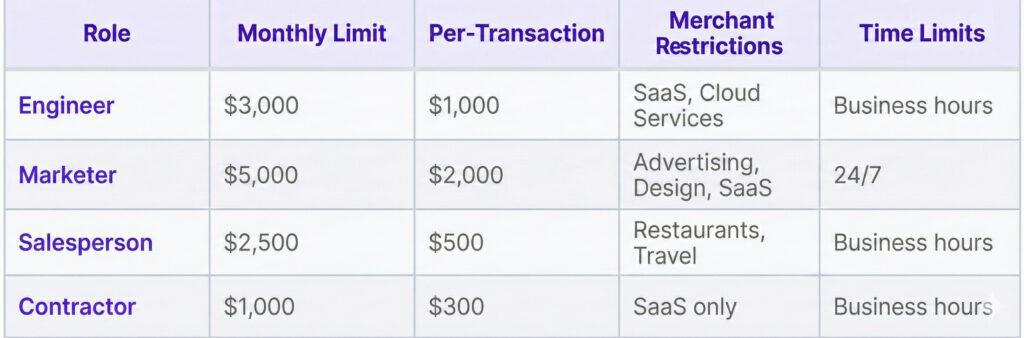
This is where virtual cards shine. You can enforce policy automatically instead of manually reviewing every transaction.
Control Options to Configure:
1. Merchant Category Blocks
- Block gambling, adult content, cash advances
- Allow only specific SaaS vendors for certain roles
- Restrict international transactions (or allow only specific countries)
2. Transaction Limits
- Per-transaction: Max $2,000 without approval
- Daily: Max $5,000 per day
- Monthly: Ties to department budget
3. Time Restrictions
- Business hours only (9 AM - 8 PM local time)
- Weekday only for certain card types
- Recurring subscription cards: Active 24/7
4. Approval Workflows
- Pre-authorization required for purchases over limit
- Manager notification for all transactions
- Real-time Slack alerts to #finance channel
Example Control Configuration:
Phase 5: Integration with Accounting (Week 3-4)
The goal: Zero manual data entry.
Must-Have Integrations:
QuickBooks Online / Xero / NetSuite:
- Auto-sync transactions daily
- Map merchant categories to GL codes
- Attach receipts to transactions
- Create expense reports automatically
Slack / Teams:
- Transaction notifications to #finance
- Approval requests to managers
- Policy violation alerts
- Budget threshold warnings
HR Systems (BambooHR / Workday):
- Auto-create cards for new hires
- Deactivate cards when employees leave
- Sync org chart for approval workflows
Setup Checklist:
☐ Connect accounting platform via OAuth ☐ Map default GL codes for common merchants ☐ Create rules for automatic categorization ☐ Set up nightly transaction sync ☐ Configure receipt matching automation ☐ Test end-to-end workflow with dummy transaction
Real-World Implementation Examples
Case Study 1: 1,000+ Employee Developer Technology Company (JFrog) Before Virtual Cards:
- Finance team faced a tidal wave of purchase requests with no control
- Closing the books was a frustrating, manual process
- Tracking purchases posed a significant impediment to the team
- Lack of synchronization with established NetSuite flows
After Virtual Cards:
- Saved 3 days each month on reconciliation
- Gained total control and real-time visibility over company spend
- Eliminated the need to chase down receipts
- established a centralized approval process
Implementation Details:
- Integrated fully with NetSuite approval flows
- Utilized automated receipt matching technology
- Consolidated spend data into a single real-time dashboard
- Streamlined international vendor card usage
Case Study 2: 100+ Employee Digital Risk Protection Company (Cyberint) Challenge:
Managing corporate spend via Excel and bank-issued corporate cards created a lack of transparency. The finance team struggled to discern who charged what, unknowingly paid for unused recurring SaaS subscriptions, and spent at least 2 days closing the books.
Solution:
- Issued digital vendor cards attached to specific budgets
- Managed everything via a centralized platform
- Enabled employees to easily request funds and reply to emails with receipts
- Automated accounting information assignment to cards
Results:
- Time to close books reduced from 2 days to 2 hours
- Saved over $5,000 on unnecessary or unused SaaS subscriptions
- Eliminated "ping-pong" communication for fund requests
- Finance team can reconcile on the fly without chasing receipts
Common Implementation Challenges (And How to Solve Them)
Challenge #1: "Employees Won't Upload Receipts"
Solution:
- Make it frictionless: Enable email/text receipt forwarding
- Use AI: Auto-match receipts to transactions
- Enforce it: Freeze cards after 2 missing receipts
- Gamify it: Monthly prize for best receipt compliance
Challenge #2: "Department Heads Want Unlimited Budgets"
Solution:
- Show historical spending data
- Start with pilot limits for first quarter
- Build in 20% buffer for unexpected needs
- Create fast approval process for overages
- Review and adjust quarterly based on actual usage
Challenge #3: "Integration Broke Our Workflow"
Solution:
- Test integrations in sandbox environment first
- Run parallel processes for 2 weeks during transition
- Have finance team manually verify first 50 transactions
- Document any sync failures and report to vendor
Challenge #4: "International Team Has Currency Issues"
Solution:
- Use virtual cards with multi-currency support
- Set budgets in USD but allow spending in local currency
- Monitor foreign transaction fees
- Consider region-specific cards for high-volume international spend
Virtual Cards vs. Alternatives: Decision Framework
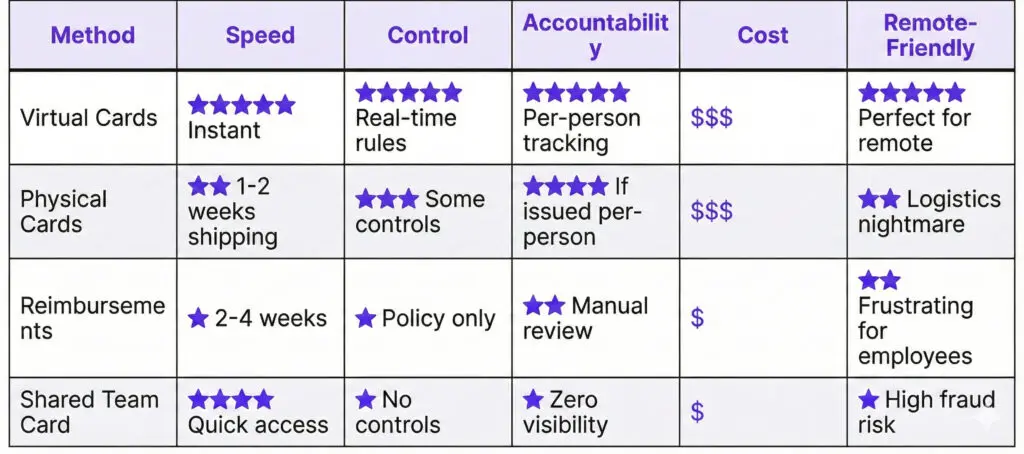
When Virtual Cards Make Sense: ✅ Team of 10+ remote employees
✅ Monthly spend >$20K across team
✅ Using QuickBooks/Xero/NetSuite
✅ Need real-time spending visibility
✅ Want to eliminate reimbursements
When to Stick with Alternatives: ❌ Team under 5 people
❌ Minimal monthly spend (<$5K)
❌ No accounting software
❌ Manual processes are working fine
Implementation Timeline & Checklist
Week 1: Planning
- [ ] Document current expense process and pain points
- [ ] Calculate monthly spend by department
- [ ] Draft spending policy
- [ ] Select virtual card provider
- [ ] Get executive buy-in
Week 2: Setup
- [ ] Create accounts for finance team
- [ ] Set up department budgets
- [ ] Configure merchant restrictions
- [ ] Create approval workflows
- [ ] Design onboarding email templates
Week 3: Integration
- [ ] Connect accounting system
- [ ] Test transaction sync
- [ ] Set up Slack/Teams notifications
- [ ] Configure receipt matching
- [ ] Train finance team
Week 4: Pilot
- [ ] Issue cards to pilot group (10-15 people)
- [ ] Run parallel with old process
- [ ] Collect feedback
- [ ] Fix any integration issues
- [ ] Document FAQs
Week 5-8: Rollout
- [ ] Issue cards department by department
- [ ] Host training sessions
- [ ] Monitor for issues
- [ ] Adjust limits based on usage
- [ ] Celebrate wins with team
Week 9+: Optimize
- [ ] Review department budgets
- [ ] Adjust spending controls
- [ ] Analyze spending patterns
- [ ] Identify cost-saving opportunities
- [ ] Share reports with leadership
Advanced Use Cases
Use Case 1: Contractor Management
Issue single-use or limited-time virtual cards for contractors:
- Freelance designer needs $2,000 for stock photos
- Create card with $2,000 limit, expires in 30 days
- Restrict to design/creative merchants only
- Card auto-deactivates when project ends
Use Case 2: Subscription Management
Create dedicated cards for recurring subscriptions:
- Software stack: Slack, GitHub, AWS, Figma, etc.
- Each subscription gets its own virtual card
- Easy to track which tools are actually being used
- Cancel cards instead of hunting down subscriptions
Use Case 3: Conference/Event Spend
Temporary cards for team attending conferences:
- Sales team going to annual conference
- Each person gets $1,500 event card
- Active only during event dates
- Merchant restrictions: Restaurants, hotels, ground transportation
- Cards auto-deactivate after event
The Bottom Line: ROI of Virtual Cards for Remote Teams
Let's talk numbers. What's the actual return on switching to virtual cards?
Time Savings:
- Finance team: 80% reduction in expense processing time
- Employees: No time spent on expense reports or reimbursement requests
- Managers: No time approving retroactive expenses
For a 100-person remote team:
- Finance saves ~52 hours/month (was 65 hours, now 13 hours)
- Employees save ~400 hours/month (100 employees × 4 hours/month)
- Total: 452 hours/month = $22,600/month at $50/hour average
Cost Avoidance:
- Prevent unauthorized spend through merchant restrictions
- Catch duplicate subscriptions (saves $5K-$15K/year for most companies)
- Reduce fraud through instant freeze capability
Cash Flow Benefits:
- No float on employee reimbursements (was $50K-$150K for some companies)
- Real-time spending visibility enables better cash management
- Faster month-end close (accounting syncs automatically)
Employee Satisfaction:
- No personal funds tied up in company expenses
- Instant spending capability (no waiting for approvals)
- Mobile app makes expense management painless
Break-even analysis:
Most companies see positive ROI within 60-90 days of implementation.
Getting Started with PayEm
PayEm provides virtual corporate cards designed specifically for distributed teams. Our platform combines spend management, virtual cards, and accounts payable automation, all without requiring personal guarantees or risking founder assets.
What makes PayEm different:
✓ Instant card issuance for new team members
✓ Department-level budgets with automatic enforcement
✓ QuickBooks/NetSuite/Xero integration out of the box
✓ Mobile-first receipt capture via text, email, or app
✓ Real-time Slack notifications for every transaction
✓ No personal guarantees required from founders
Ready to eliminate reimbursements for your remote team?